ponedjeljak, 8. lipnja 2015.

Upgrading Windows Server 2008R2 Editions With DISM

Recently i installed Windows 2008 R2 server x64 Professional on Proliant with 64GB RAM. Professional version supports only 32GB RAM so i need to upgrade to Enterprise. I found a nice blog that discribes whole process of doing that which i followed : Upgrading Windows Server 2008R2 Editions With DISM.

When i finished I was surprised that my server is showing:

Installed memory : 64GB (4GB usable).

So i went from 64GB to 32GB than 4GB. To make server to see all memory i did this:

1.       Open the command prompt and change working directory to System32 directory
2.       Type in slmgr.vbs -ckms (clears and KMS entry that i used from the formwe blog)
3.       Type slmgr.vbs -upk (removes product key )
4.       Type slmgr.vbs -ipk xxxxx-xxxxx-xxxxx-xxxxx-xxxxx (x’s is your key that you obtain from MS)

5.       Type slmgr.vbs -ato (activates server)

petak, 5. rujna 2014.

Install DEV10g na Win 7 x64


četvrtak, 21. kolovoza 2014.

Youtube video show error repeatedly and won't show

Sometimes when I try to reproduce video from a Youtube i experienced following problem:


Error:  "An error has occurred. Please try again later"

First thing that i noticed is that little red cross over sound in tray.
Go to Control Panel - >> Sound and select tab Recording
Right click on empty space and than Show Disabled Devices


Notice that sound card is disabled (somehow). Click Enable


Go to tab Playback and enable speakers. (If you have Line in enabled  and sound card missing just plug earphones in J J)


utorak, 29. srpnja 2014.

Connecting MySQL and ORACLE database - part II - Windows edition

Last post spoke about connecting MySQL database from Oracle database using Oracle Enterprise Linux. This post is almost the same but using M$ Windows. It is almost the same but without CLI.

First download latest (at the time) Connector/ODBC 5.3.2  Windows (x86, 32-bit), MSI Installer from the 
web page: : http://dev.mysql.com/downloads/connector/odbc/

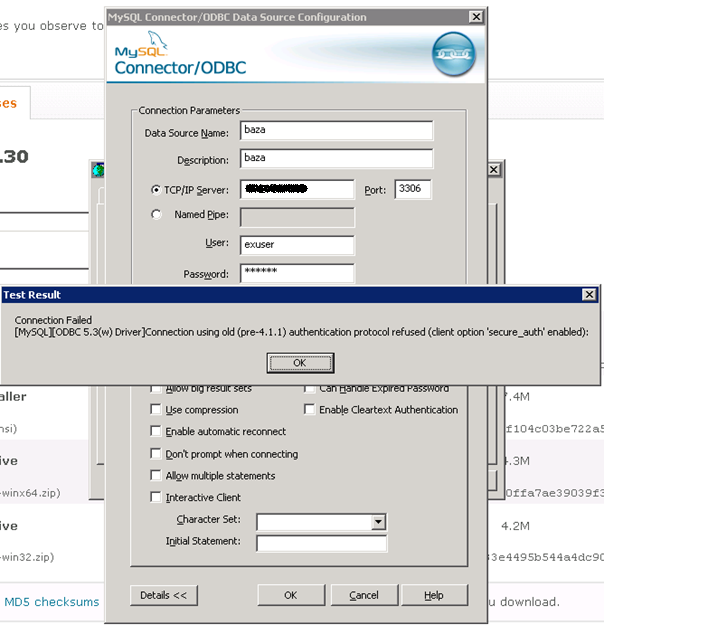
Since I am connectin pre 4.1.1 mySQL database I got this message:


 I found on OTN that bulletproof Connector version that works is 3.51.27. After some search i download it from: http://ftp.nchu.edu.tw/MySQL/downloads/connector/odbc/3.51.html

Create new ODBC source:


In listener ora i add new entry for remote database where SID_NAME is equal to Data Source Name from Connector/ODBC menu (notice that here PROGRAM is hsodbc which points that this is 32 bit Oracle 10g database):

(SID_DESC =
      (SID_NAME = baza)
      (ORACLE_HOME = c:\oracle\ora10)
      (PROGRAM = hsodbc)
    )

Add in tnsnames.ora entry for a remote database:

BAZA =
  (DESCRIPTION =
    (ADDRESS_LIST =
      (ADDRESS = (PROTOCOL = TCP)(HOST = localhost)(PORT = 1521))
    )
    (CONNECT_DATA =
      (SID = baza)
    )
    (HS = OK)
  )

In directory %ORACLE_HOME%\hs create init%sid%.ora. I create initbaza.ora with minimum required parameters

#
# HS init parameters
#
HS_FDS_CONNECT_INFO = baza
HS_FDS_TRACE_LEVEL = 0
HS_FDS_TRACE_FILE_NAME=baza.trc


#
# Environment variables required for the non-Oracle system
#
#set <envvar>=<value>

After that create user with database link to tables in MySQL database and enjoy.


četvrtak, 17. srpnja 2014.

Accessing data in MySQL server through ORACLE Database

Setup:
MySQL Server version mysqld-4.0.27-nt on Windows 2008 Server x32
Oracle Database 10.2.0.5.0 on Linux 2.6.32
Oracle Database 11.2.0.0.0 "Oracle 11g Gateway Connectivity - dg4odbc" on Linux 2.6.32
MySQL Connector 3.51.27

I uses particular version of MySQL Connector for two reasons:

When I used last 3.51 version which is 3.51.30 in Oracle I got only row from MySQL database. After reading on OTN and Metalink someone suggested 3.51.27 and all worked as a charm.

When I use newer MySQL ODBC connector (5.1.13 or newer) I got error "Connection using old (pre-4.1.1) authentication protol refused (client option 'secure_auth' enabled)".

Procedure:

Install ODBC connector:
[root@localhost ~]#  rpm -Uvh mysql-connector-odbc-3.51.27-0.x86_64.rpm

Check if driver exists in odbcinst.ini

odbcinst.ini is located in /etc or /usr/local/etc

vi /usr/local/etc/odbcinst.ini

[PostgreSQL]
Description             = ODBC for PostgreSQL
Driver          = /usr/lib/libodbcpsql.so
Setup           = /usr/lib/libodbcpsqlS.so
FileUsage               = 1

[MySQL ODBC 3.51 Driver]
DRIVER          = /usr/lib64/libmyodbc3.so
UsageCount              = 1


Create odbc.ini and enter driver and connection information

vi /usr/local/etc/odbc.ini

[baza]
Description     = ODBC for MySQL
Driver          = /usr/lib64/libmyodbc3.so
SERVER = %IP_ADDRESS_OF_MYSQL_SERVER%
PORT = 3306
USER = %USER_NAME_ON_MYSQL_SIDE%
Password = %PASSWORD_ON_MYSQL_SIDE%
Database = baza
CHARSET=latin1


Create entry in listener.ora. Listener is created in Oracle 10g home, but later for connection we will use Oracle 11g Gateway Connectivity - dg4odbc which is installed in separate 11G home.
Reason for that is that 64-bit Oracle database could not use hsodbc driver and it is needed to install Oracle 11g Gateway Connectivity - dg4odbc in separate home.
I had both database homes on same server so it was somewhat easier for me.

vi /u01/app/10.2.0/db/network/admin/listener.ora
baza =
   (DESCRIPTION_LIST =
     (DESCRIPTION =
       (ADDRESS_LIST =
         (ADDRESS = (PROTOCOL = TCP)(HOST = localhost)(PORT = 1527))
                                                      )
   )
                 )
SID_LIST_baza =
   (SID_LIST =
        (SID_DESC =
                (PROGRAM = dg4odbc) %Using 11g executable%
                (ORACLE_HOME = /u01/app/11.2.0/db) %Using 11g HOME%
                (SID_NAME = baza)
                (ENVS=LD_LIBRARY_PATH=/usr/lib64:/usr/local/:/usr/local/etc:/usr/lib/:/u01/app/11.2.0/db/lib) %Metalink recomends using ENVS Variable in listener%
        )
   )

Create tnsnames.ora enty (In Oracle 10g Home)

vi /u01/app/10.2.0/db/network/admin/tnsnames.ora

baza=
  (DESCRIPTION =
    (ADDRESS_LIST =
        (ADDRESS = (PROTOCOL = TCP)(HOST = localhost )(PORT = 1527)))
     (CONNECT_DATA =
        (SID = baza))
        (HS=OK)
)

Create ODBC HS ini file (In Oracle 11g Home)

/u01/app/11.2.0/db/hs/admin/initbaza.ora

# This is a sample agent init file that contains the HS parameters that are
# needed for an ODBC Agent.
                             
#
# HS init parameters
#
HS_FDS_CONNECT_INFO = baza
# HS_FDS_TRACE_LEVEL = DEBUG
# HS_FDS_TRACE_LEVEL=user
HS_FDS_TRACE_LEVEL=0
HS_FDS_SHAREABLE_NAME = /usr/lib64/libodbc.so

#
# ODBC specific environment variables
#
set ODBCINI=/usr/local/etc/odbc.ini


#
# Environment variables required for the non-Oracle system
#
# set <envvar>=<value>

After that you only need to create database link in Oracle 10g database. Put username and password in quotation marks if columns in MySQL datavase are declared with a case sensitive or binary collation

create database link baza
connect to "exuser"
identified by "userex"
using 'baza';


If you want a column always to be treated in case-sensitive fashion, declare it with a case sensitive or binary collation

nedjelja, 13. srpnja 2014.

Using Microsoft Query to retrieve data from Oracle 10G in Excel


Configuration:
Windows 7 x64 Enterprise
Office Professional x64 (Excel 2010)

Microsoft Query (part of excel x64)

Step 1:
Download Instant Client Package - Basic: All files required to run OCI, OCCI, and JDBC-OCI applications (instantclient-basic-windows.x64-11.2.0.4.0.zip (54,956,947 bytes)) from the website http:// www.oracle.com/technetwork/topics/winx64soft-089540.html
• Create a home directory for example: C: \ ORACLE \ ORACLI11
• unpack the zip file in the directory C: \ ORACLE \ ORACLI11

Step 2:
• Download Instant Client Package - ODBC: Additional libraries for enabling ODBC applications
• (instantclient-odbc-windows.x64-11.2.0.4.0.zip (1,358,385 bytes))
• unpack the files from the zip file in the folder C: \ ORACLE \ ORACLI11
• Start the Command Prompt as Administrator (Run As Administratr)
• In the directory C: \ ORACLE \ ORACLI11 run file odbc_install.exe
• Copy sqlnet.ora and tnsnames in the folder C: \ ORACLE \ ORACLI11
• Create Enviroment a variable TNS_ADMIN and set the value as C: \ ORACLE \ ORACLI11
• After that, should the ODBC to appear: 


Step 3:
• Start MS Excel
• Choose "Tab Data"
• Choose "From other sources"
• Choose "Microsoft Query"


"Choose Data Source" than "New Data Source" ("Select the default table ..." is  gray for now) 


• Choose "Connect" 


 Service Name: tnsnames.ora entry for the selected database 

"Select the default table..." is no longer gray and gives a choice of a table 


 • In the "Query Wizard" choose the columns that will be used: 


• In the "Filter Data" select what row would you like to include


• In the "Sort Order" choose columns to sort data: 


• And finally choose to return the data to Microsoft Excel:


četvrtak, 3. srpnja 2014.

Oracle Reports 10G: Windows registry REPORTS_PATH can be extended up to 1024 characters.

On some of test servers I usually use built in report server and to add more applications (paths where rdf's are) I extend REPORTS_PATH variable in registry. Problem is when more application accumulate there are more entries in registry variable.
Maximum is 1024 characters for REPORTS_PATH variables. When that point is reached new reports servers are created.

Procedure to create a report server (Oracle Forms and Reports services server, but can be used on all Oracle Midtier servers):


  • Open command prompt (elevated command prompt):

                           rwserver server=%server_name% start


  • Shut down the opmn:

                          %OracleMiddleTierHome%\opmn\bin\opmnctl stopall


  • Add new server target (command prompt will close automatically if everything is ok):

                           %OracleMiddleTierHome%\bin\addNewServerTarget.bat %server_name%

  • Open command prompt (elevated command prompt):
                          %OracleMiddleTierHome%\dcm\bin\dcmctl.bat updateconfig -ct opmn -v -d
                          %OracleMiddleTierHome%\ dcm\bin\dcmctl.bat resyncinstance -v -d


  • Start the opmn

                         %OracleMiddleTierHome%\opmn\bin\opmnctl startall


Add into the configuration source directory where reports are (use Enterpise manager) (I also sometimes change the number of engines):

                         %OracleMiddleTierHome%\reports\conf\rep_razees.conf

   <engine id="rwEng" class="oracle.reports.engine.EngineImpl" initEngine="1" maxEngine="2" minEngine="1" engLife="50" maxIdle="30" callbackTimeOut="90000">
      <property name="sourceDir" value="C:\ORACLE\APLI10\DS10G\RAZ_EES_RSRV"/>
      <!--property name="tempDir" value="your reports temp directory"/-->
      <!--property name="keepConnection" value="yes"/-->
   </engine>


utorak, 1. srpnja 2014.

How to Fix: The trust relationship between this workstation and the primary domain failed

Some time trust between workstation and primary domain faile so I cant log on as domain user or map network drive or share. When I try to map shared folder from such server or workstation I usually get error: windows error 0x80004005.
There are few solutions but most popular is to remove server or workstation from domain, restart and join again.
Microsoft gave us some tools to do that without removing server from a domain.

1. Use Powershell: Start Windows Powershell as administrator than write:

Reset-ComputerMachinePassword -Server <Name of any domain controller> -Credential <domain admin account>

2. Use netdom: Start command prompt as administrator than write:

netdom resetpwd /Server:<name of any domain controller> /UserD:<domain admin account> /PasswordD:<password>

I usually reboot server after to be completely sure that server joined domain.

utorak, 8. travnja 2014.

Weblogic - Change locale for ADF Server

Recently on a project i had an ADF application which was using date and sort formats in en/GB regional settings. Since i need to use Croatian date formats i need to change it in Weblogic server.


  • Login to Weblogic Administration Console
  • Choose Servers
  • Choose ADFServer (the name it gets from installation)
  • Select Configuration à Server Start tab
  • Select Lock&Edit to be able to insert new values
  • Insert into Arguments field: -Duser.language=hr -Duser.country=HR with space between or multi line
  • Save Configuration
  • Restart ADF Server


ponedjeljak, 17. ožujka 2014.

Setting Toad NLS_LANG when using Oracle Instant client in Windows

When I use Toad (any version) with the Oracle Instant client i usually get mixed up session NLS parameters. When i have some kind of Oracle development tools i need to edit just NLS_LANG registry key in my preferred home.
When i use instant client easiest way is to edit directly through Toad:


First step is to click on the 3 dots near Oracle home used. If NLS_LANG is empty double click on it and answer "Yes" to "Are you sure" question, Enter the preferred NLS_LANG and Toad will populate required Oracle keys in the registry.

srijeda, 19. veljače 2014.

BI Publisher OC4J as a Windows service

To install Bi Publisher as a Windows service and forgot about OC4Jstart.cmd skript You need to do following:

  • Download Java service

                     http://forge.ow2.org/projects/javaservice/
  • Copy Java service to a folder on Oracle Application server (OAS)

         C:\oracle\javaservice
  • Install Java JDK 1.6u45 on OAS
  •  Go to BI Publisher OC4J folder  c:\ORACLE\Bipublisher\oc4j_bi\bin and check oc4j.cmd for JVMARGS :

         Set JVMARGS=-XX:MaxPermSize=128m  –Xmx512m  %OC4J_JVM_ARGS
  •  Go to c:\oracle\javaservice in command prompt and run

javaservice -install "ORACLE BIP OC4J" "C:\Program Files\Java\jdk1.6.0_45\jre\bin\client\jvm.dll" -XX:MaxPermSize=128m -Xmx512m "-Djava.class.path=C:\ORACLE\BIPUBLISHER\oc4j_bi\j2ee\home\oc4j.jar" -start oracle.oc4j.loader.boot.BootStrap -out "C:\bip.log.txt" -err "C:\bip.err.txt" -description "Oracle BI EE OC4J Service"
  • Go to sevices.msc and start ORACLE BIP OC4J service


srijeda, 5. veljače 2014.

Restricting users from some components in Apex 4.2 application

  • Create Groups to differentiate users:

  • Edit users and add them to Groups. If a user is Administrator than put it in Admin group.
  • Go to Application builder  -> Application -> Shared Components -> Authorization Schemes and create a new Authorization Scheme.
  • Select From Scratch
  • In Authorization Scheme put following PL/SQL

  • Go to the Application page that you want to prevent all users seeing (only Admin group)  and in Security choose the scheme you want:


nedjelja, 24. studenoga 2013.

How to create test user in test database from production database with impdp

Some time ago i had a need to create identical user on a test database every hour. To solve that i used impdp ability to use transfer over database link.
I have two databases . Production "db_prod" and test database "db_test". User that i am transferring has to preserve its name for easier testing.

1. Create public database link on db_test as SYSTEM:
 create a public database link DB_PROD connect to system identified by xxxxx using ‘DB_PROD_ALIAS’;

2. Insert data (create users and all) from db_prod to db_test with impdp:
impdp system/xxxxxx@db_test schemas=user_prod network_link=db_prod_alias

This way there is no need to use remap_schema since both user names are the same. There is no need to use data_pump_dir because all transfer is done by database link.
There is some more job to be done. I ran script by hand at first to see what objects are giving me warning (Roles, references to another user) and to create a script to prepare test database for fresh injection of a test user. That means usually to drop existing user from db_test, create roles if needed (impdp will fill them with appropriate grants).

ponedjeljak, 4. studenoga 2013.

Install Oracle Developer 6i on Windows 7 x64

I have a need to install Oracle Forms and Reports Developer suite 6i  with patch 14 on much newer WIndows 7 Professional 64-bit. At first attempt i tried and succeeded to install it all in 64 bit environment using Compatibility options but when i started to work with the tools i encountered many problems.
Next step was to install it in Windows Virtual PC )XP Mode). Steps to do so are:

  1. Install Windows XP mode and Virtual PC as in instructions: http://windows.microsoft.com/en-us/windows7/install-and-use-windows-xp-mode-in-windows-7
  2. Download and install XP mode : http://www.microsoft.com/en-us/download/details.aspx?id=8002
  3. Download and install VirtualPC : http://www.microsoft.com/en-us/download/details.aspx?id=3702
  4. Create default XP machine and edit settings (i usually get RAM to 1GB):


After that i started XP mode, set up initial password for XPMode (this is required. Windows XP mode remembers this password, but in later actions it can ask for it. Sometimes when that password is blank, XPmode throws an error. On this site there is a manual how to reset: http://www.mydigitallife.info/resetand-fix-incorrect-or-wrong-password-for-windows-xp-mode-xpmuser/) and install Developer 6i. After that i put valid tnsnames.ora and sqlpnet.ora at %ORACLE_HOME%\network\admin directory.
Now Developer tools could be run directly in XPmode machine (some people find it easier) or from Windows 7 Start menu:


ponedjeljak, 16. rujna 2013.

FRM-92095 and Oracle Forms 10G Builder

Recently i was doing a test to move files from Application server to File server and than to get them using webutil. But in meantime i installed Windows7 x64 and reinstall forms 10g builder on my new PC.
When i try to run form locally with OC4j i got FRM-92095 although i had installed 32 bit versions of multiple 1.3.x.x. Jinitiators.
The problem was that only JRE and JDK installed on PC was JDK7u21 (x64) and when i try to run form i got following:

After i got that error i installed JRE 1.6.u45 from :

The next step was either:
  • Set up JRE 1.6u45 as default Java either in System and User enviroment through Control Panel
  • or uninstall 64-bit Java version


srijeda, 4. rujna 2013.

Setting new Font in BI Publisher 10.1.3.4.1

From time to time there is a need to set up a new font for RTF,HTML or PDF reports in BI Publisher. Fonts could be inserted system wide or per a report.

To insert font for only one report to get it in all those types of reports:

--> Copy font (*.ttf file) to the directory : C:\ORACLE\BIPUBLISHER\jdk\lib\fonts where c:\oracle\bipublisher is where BI Publisher is installed

-->  edit xdo.cfg file of report that is found in c:\ORACLE\BIPUBLISHER\xmlp\XMLP\Reports\"Report Folder"\"Report Name":

<config version="1.0.0" xmlns="http://xmlns.oracle.com/oxp/config/">
    <!-- Properties -->
    <properties>
        <!-- System level properties -->
        <!-- PLEASE SELECT A VALID TEMPFILE DIRECTORY!!! -->
        <property name="system-temp-dir">c:/Temp</property>
        <property name="rtf-circlefull-glyph">Wingdings 2;002;154</property>
        <property name="rtf-circleempty-glyph">Wingdings 2;002;152</property>
        <property name="rtf-checkbox-glyph">Wingdings 2;152;153</property>
 <!-- Font setting -->
    <fonts>
      <!-- Windows Wingdings font -->
      <font family="WingDings 2" style="normal" weight="normal">
       <truetype path="wingdng2.ttf"/> 
      </font
    </fonts>

</config>

Note: in this case WingDings2 font is used. Best case is to use lowecase in scripts and file name on OS side.

--> Edit or check configuration of report. If there is no value put this:


How to reset Apex internal password with a script.

This is the script i use to reset Apex password in Apex version 4.x.

  • Login to db as sysdba
  • Check what verison is APEX user (mine case is 4.2 or APEX_040200)
  • Execute Script
Script:


set define '&'

set verify off

alter session set current_schema = APEX_040200;

prompt ...changing password for ADMIN

begin

  wwv_flow_security.g_security_group_id := 10;
  wwv_flow_security.g_user := 'ADMIN';
  wwv_flow_security.g_import_in_progress := true;

  for c1 in (select user_id from wwv_flow_fnd_user
      where security_group_id = wwv_flow_security.g_security_group_id
      and user_name = wwv_flow_security.g_user) loop

     wwv_flow_fnd_user_api.edit_fnd_user(
       p_user_id => c1.user_id,
       p_user_name => wwv_flow_security.g_user,
       p_web_password => '&1',
       p_new_password => '&1');

  end loop;

  wwv_flow_security.g_import_in_progress := false;

end;
/

commit;
/

utorak, 11. lipnja 2013.

Working with Oracle Forms Developer 10G on Windows 7 Pro x64

First problem is to install Forms 10G on Windows 7 (either 32 bit or 64 bit). Steps to achieve this are :


  • Change Windows 7 virtual memory from automatic to manually since OUI do not recognize automatic virtual memory ( set it from 6000M to 12000M on 4GB Ram machine)
  • In setup.exe change compatibility mode to "Windows XP SP2 (or 3)" and set "Run As Administrator"
  • Ignore PSAPI.DLL errors for now. I did not come to any problems for now ignoring this errors.
Now you can run Forms, load new form and so on. But the problem is when you start OC4J Instace to run form locally (with default Forms Jinitiator) in IE8 or IE9 nothing happens. So i changed runtime to run froms with default JRE installed on system. To do so i changed in formsweb.cfg:

  • baseHTML=base.htm --> baseHTML=basejpi.htm
  • baseHTMLjinitiator=basejini.htm --> baseHTMLjinitiator=basejpi.htm
  • jpi_mimetype=application/x-java-applet;jpi-version=1.4.2_06 --> jpi_mimetype=application/x-java-applet
With mimetype i ommit the version number so there is no need to instal JRE 1.4.2_06. Instead forms runtime process is using any JRE installed on system (in my case it is 1.7.0_21)

I read that on Firefox 12 version number is a must but did not tested that.

ponedjeljak, 10. lipnja 2013.

How to Convert Oracle Reports to UTF-8

One of the problems i faced recently is how to convert CP1250 (EE8MSWIN1250) codepage to UTF-8 codepage in Oracle Reports. Problem is  that Forms and Reports server is installed with NLS_LANG set to EE8MSWIN1250 with 5 applications consist of hundreds forms and reports. One smaller app need to execute reports with RUN_REPORT_OBJECT but in UTF-8 codepage.

One solution was to install separate Report Server with NLS_LANG set to UTF-8 but that requires more resources and licences.
My solution is to use GNU software called ICONV (http://www.gnu.org/software/libiconv/) which converts files to another code page.
First task is to create report (.XML) on report server with RUN_REPORT_OBJECT to some folder.
Than with host comand execute next batch script:

set PATH=D:\oracle\FRHome\jdk\bin;C:\Iconv\bin -- i use to copy all windows PATH to this variable
iconv -f CP1250 -t UTF-8 %1 > %2 -- %1 is source where CP1250 report is
                                                           -- %2 is where we put UTF8 report to

exit

After that i call Web.Show_document to show UTF-8 file in IE9.


subota, 11. svibnja 2013.

Oracle IAS (FORMS) memory mapped file I/O

When running forms on application server as a production everyone is setting FORMS_MMAP=TRUE or leave it unassignet to relieve memory demands on a server. The rule is to put new or updated forms to server at designeted time (I am doing that at midnight when restarting Forms services). But what happened when programmer need to update some forms immediately during peek time.
Suppose that we have multiple forms (100+) from different enviroments. The problem is how to copy requested forms on form server.
One idea is to put FORMS_MMAP to FALSE but that could be too heavy on server memory demands for Forms services. Another idea is to stop OC4J_BI_FORMS through enterprise management but than we hace to disconnect all users, not only that use particular form.
I made a solution in form of a VBS script which create batch file (Windows) to kill only those processes that uses enviroment of a form i need to replace:


'First input name of Forms server (could use InputBox if more than one server)  
strComputer = "server_name"

'Define arguments
Dim arg
Dim pass
Dim argpass

'Define passwords
pass="******"

'Get user to write a password 
argpass=InputBox("Unesite Password:")

'Define output file
Set objFSO = CreateObject("Scripting.FileSystemObject")
Set objFile = objFSO.CreateTextFile("output.bat", True)

'Set WmiService
Set objWMIService = GetObject("winmgmts:\\" & strComputer & "\root\cimv2") 

'Get frmwebprocesses
Set colItems = objWMIService.ExecQuery("Select * from Win32_Process where name='frmweb.exe'")

If pass = argpass Then  

'Get the name of env file
arg = InputBox("What application you need to stop?")
arg=LCase(arg)

'Fill the output.bat file
For Each objItem in colItems
        proc=objItem.ProcessID
     'Get command line 
                     '(actually you get webfile=HTTP-0,0,1,name_of_app_from_env,ip_address)
                     line = objItem.CommandLine
    linesplit=Split(line,",",5) 'Extract the name of aplication from command line
    app=linesplit(3)
    app=LCase(app)
    If arg=app Then     
    objFile.WriteLine "pskill.exe " & proc 'Write the output.bat file
    End if
Next
End if

Output of a VBS script is a batch file output.bat which consists:
pskill.exe 1345
pskill.exe 1328
pskill.exe 1479
pskill.exe 1511

Pskill can be downloaded from: http://technet.microsoft.com/en-us/sysinternals/bb896683.aspx