- Install Oracle instan Client 11 in C:\Oracli11 and set TNS_ADMIN variable in enviroment variables
- Rename TNSNAMES.ORA in C:\Oracli11
- Check if Swap space is set to System and than change it to Manual as shown in: https://support.oracle.com/epmos/faces/DocumentDisplay?_afrLoop=256228337823023&id=559067.1&_afrWindowMode=0&_adf.ctrl-state=5clujo4tm_4 . Recomendation is to set Swap from 1x Physical memory to 3x Physical Memory. Windows usually show recomended value. On 8GB RAM i usually set from 12GB to 16GB
- Check for LD_LIBRARY_PATH in enviroment variables. If exists save value and temporariliy delete it until DEVELOPER 10g is installed. After installation recreate the variable. Source: http://windows7bugs.wordpress.com/2013/04/28/oiilnativeexception-is-thrown-while-installing-older-oracle-products-windows/
- Copy Installation of DEVELOPER 10G to local disk and in \disk1\install directory change compatibility to Windows XP SP3 and check Run as Administrator. Same thing should be apply to patch directory if there is need to install it
- Create DEV 10 home directory C:\ORACLE\DEV10G
- Install DEVELOPER 10G
- Install PATCH if needed (Set compatibility as in Developer 10G)
- Change security properties of folder C:\ORACLE\DEV10G. Add running user (the user that should use Developer tools) and set it to FULL CONTROL
- All shortcut icons compatibility set to Windows XP SP3 and Run as Administrator
- Install
Patch p6880880_101000_WINNT – Upgrades Opatch Utility to 1.0.0.64
- Install Patch p7047034_10105_WINNT https://support.oracle.com/epmos/faces/DocumentDisplay?_afrLoop=256613499054977&id=727410.1&_afrWindowMode=0&_adf.ctrl-state=5clujo4tm_94
- Install Patch p9593176_10123_WINNT
- Install Patch p13413002_10105_WINNT
Prikazani su postovi s oznakom ORACLE. Prikaži sve postove
Prikazani su postovi s oznakom ORACLE. Prikaži sve postove
petak, 5. rujna 2014.
Install DEV10g na Win 7 x64

utorak, 29. srpnja 2014.
Connecting MySQL and ORACLE database - part II - Windows edition
Last post spoke about connecting MySQL database from Oracle database using Oracle Enterprise Linux. This post is almost the same but using M$ Windows. It is almost the same but without CLI.
First download latest (at the time) Connector/ODBC 5.3.2 Windows (x86, 32-bit), MSI Installer from the
web page: : http://dev.mysql.com/downloads/connector/odbc/
Since I am connectin pre 4.1.1 mySQL database I got this message:
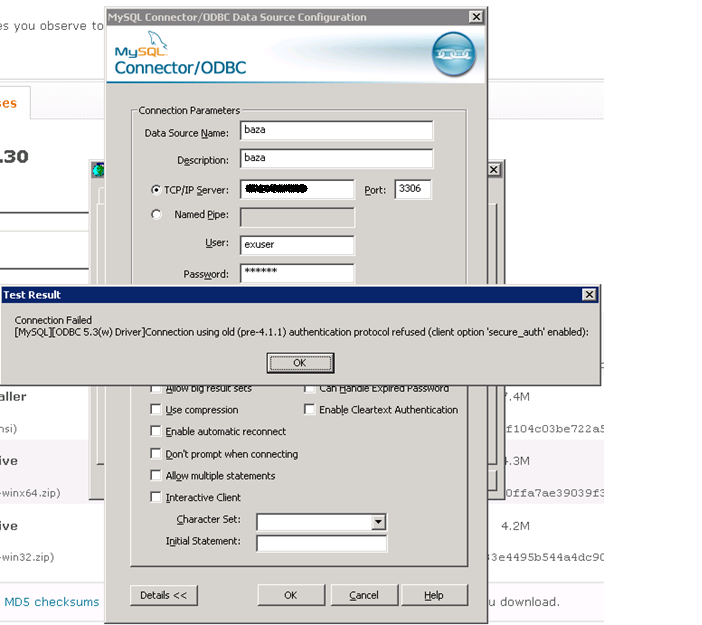
I found on OTN that bulletproof Connector version that works is 3.51.27. After some search i download it from: http://ftp.nchu.edu.tw/MySQL/downloads/connector/odbc/3.51.html

First download latest (at the time) Connector/ODBC 5.3.2 Windows (x86, 32-bit), MSI Installer from the
web page: : http://dev.mysql.com/downloads/connector/odbc/
Since I am connectin pre 4.1.1 mySQL database I got this message:
I found on OTN that bulletproof Connector version that works is 3.51.27. After some search i download it from: http://ftp.nchu.edu.tw/MySQL/downloads/connector/odbc/3.51.html
Create new ODBC source:
In listener ora i add new entry for remote database where SID_NAME is equal to Data Source Name from Connector/ODBC menu (notice that here PROGRAM is hsodbc which points that this is 32 bit Oracle 10g database):
(SID_DESC =
(SID_NAME = baza)
(ORACLE_HOME = c:\oracle\ora10)
(PROGRAM = hsodbc)
)
Add in tnsnames.ora entry for a remote database:
BAZA =
(DESCRIPTION =
(ADDRESS_LIST =
(ADDRESS = (PROTOCOL = TCP)(HOST = localhost)(PORT = 1521))
)
(CONNECT_DATA =
(SID = baza)
)
(HS
= OK)
)
In directory %ORACLE_HOME%\hs create init%sid%.ora. I create initbaza.ora with minimum required parameters
#
# HS init parameters
#
HS_FDS_CONNECT_INFO = baza
HS_FDS_TRACE_LEVEL = 0
HS_FDS_TRACE_FILE_NAME=baza.trc
#
# Environment variables required for the
non-Oracle system
#
#set <envvar>=<value>
After that create user with database link to tables in MySQL database and enjoy.
četvrtak, 17. srpnja 2014.
Accessing data in MySQL server through ORACLE Database
Setup:
MySQL Server version mysqld-4.0.27-nt on Windows 2008 Server x32
Oracle Database 10.2.0.5.0 on Linux 2.6.32
Oracle Database 11.2.0.0.0 "Oracle 11g Gateway Connectivity - dg4odbc" on Linux 2.6.32
MySQL Connector 3.51.27
I uses particular version of MySQL Connector for two reasons:
When I used last 3.51 version which is 3.51.30 in Oracle I got only row from MySQL database. After reading on OTN and Metalink someone suggested 3.51.27 and all worked as a charm.
When I use newer MySQL ODBC connector (5.1.13 or newer) I got error "Connection using old (pre-4.1.1) authentication protol refused (client option 'secure_auth' enabled)".
Procedure:
Install ODBC connector:
[root@localhost ~]# rpm -Uvh mysql-connector-odbc-3.51.27-0.x86_64.rpm
Check if driver exists in odbcinst.ini
odbcinst.ini is located in /etc or /usr/local/etc
vi /usr/local/etc/odbcinst.ini
[PostgreSQL]
Description = ODBC for PostgreSQL
Driver = /usr/lib/libodbcpsql.so
Setup = /usr/lib/libodbcpsqlS.so
FileUsage = 1
[MySQL ODBC 3.51 Driver]
DRIVER = /usr/lib64/libmyodbc3.so
UsageCount = 1
Create odbc.ini and enter driver and connection information
vi /usr/local/etc/odbc.ini
[baza]
Description = ODBC for MySQL
Driver = /usr/lib64/libmyodbc3.so
SERVER = %IP_ADDRESS_OF_MYSQL_SERVER%
PORT = 3306
USER = %USER_NAME_ON_MYSQL_SIDE%
Password = %PASSWORD_ON_MYSQL_SIDE%
Database = baza
CHARSET=latin1
Create entry in listener.ora. Listener is created in Oracle 10g home, but later for connection we will use Oracle 11g Gateway Connectivity - dg4odbc which is installed in separate 11G home.
Reason for that is that 64-bit Oracle database could not use hsodbc driver and it is needed to install Oracle 11g Gateway Connectivity - dg4odbc in separate home.
I had both database homes on same server so it was somewhat easier for me.
vi /u01/app/10.2.0/db/network/admin/listener.ora
baza =
(DESCRIPTION_LIST =
(DESCRIPTION =
(ADDRESS_LIST =
(ADDRESS = (PROTOCOL = TCP)(HOST = localhost)(PORT = 1527))
)
)
)
SID_LIST_baza =
(SID_LIST =
(SID_DESC =
(PROGRAM = dg4odbc) %Using 11g executable%
(ORACLE_HOME = /u01/app/11.2.0/db) %Using 11g HOME%
(SID_NAME = baza)
(ENVS=LD_LIBRARY_PATH=/usr/lib64:/usr/local/:/usr/local/etc:/usr/lib/:/u01/app/11.2.0/db/lib) %Metalink recomends using ENVS Variable in listener%
)
)
Create tnsnames.ora enty (In Oracle 10g Home)
vi /u01/app/10.2.0/db/network/admin/tnsnames.ora
baza=
(DESCRIPTION =
(ADDRESS_LIST =
(ADDRESS = (PROTOCOL = TCP)(HOST = localhost )(PORT = 1527)))
(CONNECT_DATA =
(SID = baza))
(HS=OK)
)
Create ODBC HS ini file (In Oracle 11g Home)
/u01/app/11.2.0/db/hs/admin/initbaza.ora
# This is a sample agent init file that contains the HS parameters that are
# needed for an ODBC Agent.
#
# HS init parameters
#
HS_FDS_CONNECT_INFO = baza
# HS_FDS_TRACE_LEVEL = DEBUG
# HS_FDS_TRACE_LEVEL=user
HS_FDS_TRACE_LEVEL=0
HS_FDS_SHAREABLE_NAME = /usr/lib64/libodbc.so
#
# ODBC specific environment variables
#
set ODBCINI=/usr/local/etc/odbc.ini
#
# Environment variables required for the non-Oracle system
#
# set <envvar>=<value>
After that you only need to create database link in Oracle 10g database. Put username and password in quotation marks if columns in MySQL datavase are declared with a case sensitive or binary collation
create database link baza
connect to "exuser"
identified by "userex"
using 'baza';
If you want a column always to be treated in case-sensitive fashion, declare it with a case sensitive or binary collation
MySQL Server version mysqld-4.0.27-nt on Windows 2008 Server x32
Oracle Database 10.2.0.5.0 on Linux 2.6.32
Oracle Database 11.2.0.0.0 "Oracle 11g Gateway Connectivity - dg4odbc" on Linux 2.6.32
MySQL Connector 3.51.27
I uses particular version of MySQL Connector for two reasons:
When I used last 3.51 version which is 3.51.30 in Oracle I got only row from MySQL database. After reading on OTN and Metalink someone suggested 3.51.27 and all worked as a charm.
When I use newer MySQL ODBC connector (5.1.13 or newer) I got error "Connection using old (pre-4.1.1) authentication protol refused (client option 'secure_auth' enabled)".
Procedure:
Install ODBC connector:
[root@localhost ~]# rpm -Uvh mysql-connector-odbc-3.51.27-0.x86_64.rpm
Check if driver exists in odbcinst.ini
odbcinst.ini is located in /etc or /usr/local/etc
vi /usr/local/etc/odbcinst.ini
[PostgreSQL]
Description = ODBC for PostgreSQL
Driver = /usr/lib/libodbcpsql.so
Setup = /usr/lib/libodbcpsqlS.so
FileUsage = 1
[MySQL ODBC 3.51 Driver]
DRIVER = /usr/lib64/libmyodbc3.so
UsageCount = 1
Create odbc.ini and enter driver and connection information
vi /usr/local/etc/odbc.ini
[baza]
Description = ODBC for MySQL
Driver = /usr/lib64/libmyodbc3.so
SERVER = %IP_ADDRESS_OF_MYSQL_SERVER%
PORT = 3306
USER = %USER_NAME_ON_MYSQL_SIDE%
Password = %PASSWORD_ON_MYSQL_SIDE%
Database = baza
CHARSET=latin1
Create entry in listener.ora. Listener is created in Oracle 10g home, but later for connection we will use Oracle 11g Gateway Connectivity - dg4odbc which is installed in separate 11G home.
Reason for that is that 64-bit Oracle database could not use hsodbc driver and it is needed to install Oracle 11g Gateway Connectivity - dg4odbc in separate home.
I had both database homes on same server so it was somewhat easier for me.
vi /u01/app/10.2.0/db/network/admin/listener.ora
baza =
(DESCRIPTION_LIST =
(DESCRIPTION =
(ADDRESS_LIST =
(ADDRESS = (PROTOCOL = TCP)(HOST = localhost)(PORT = 1527))
)
)
)
SID_LIST_baza =
(SID_LIST =
(SID_DESC =
(PROGRAM = dg4odbc) %Using 11g executable%
(ORACLE_HOME = /u01/app/11.2.0/db) %Using 11g HOME%
(SID_NAME = baza)
(ENVS=LD_LIBRARY_PATH=/usr/lib64:/usr/local/:/usr/local/etc:/usr/lib/:/u01/app/11.2.0/db/lib) %Metalink recomends using ENVS Variable in listener%
)
)
Create tnsnames.ora enty (In Oracle 10g Home)
vi /u01/app/10.2.0/db/network/admin/tnsnames.ora
baza=
(DESCRIPTION =
(ADDRESS_LIST =
(ADDRESS = (PROTOCOL = TCP)(HOST = localhost )(PORT = 1527)))
(CONNECT_DATA =
(SID = baza))
(HS=OK)
)
Create ODBC HS ini file (In Oracle 11g Home)
/u01/app/11.2.0/db/hs/admin/initbaza.ora
# This is a sample agent init file that contains the HS parameters that are
# needed for an ODBC Agent.
#
# HS init parameters
#
HS_FDS_CONNECT_INFO = baza
# HS_FDS_TRACE_LEVEL = DEBUG
# HS_FDS_TRACE_LEVEL=user
HS_FDS_TRACE_LEVEL=0
HS_FDS_SHAREABLE_NAME = /usr/lib64/libodbc.so
#
# ODBC specific environment variables
#
set ODBCINI=/usr/local/etc/odbc.ini
#
# Environment variables required for the non-Oracle system
#
# set <envvar>=<value>
After that you only need to create database link in Oracle 10g database. Put username and password in quotation marks if columns in MySQL datavase are declared with a case sensitive or binary collation
create database link baza
connect to "exuser"
identified by "userex"
using 'baza';
If you want a column always to be treated in case-sensitive fashion, declare it with a case sensitive or binary collation
nedjelja, 13. srpnja 2014.
Using Microsoft Query to retrieve data from Oracle 10G in Excel
Configuration:
Windows 7 x64 Enterprise
Office Professional x64 (Excel 2010)
Microsoft Query (part of excel x64)
Step 1:
• Download Instant Client Package - Basic: All
files required to run OCI, OCCI, and JDBC-OCI applications
(instantclient-basic-windows.x64-11.2.0.4.0.zip (54,956,947 bytes))
from the website http:// www.oracle.com/technetwork/topics/winx64soft-089540.html
• Create a home directory for example: C: \ ORACLE \
ORACLI11
• unpack the zip file in the directory C: \ ORACLE \
ORACLI11
Step 2:
• Download Instant Client Package - ODBC: Additional libraries for
enabling ODBC applications
• (instantclient-odbc-windows.x64-11.2.0.4.0.zip (1,358,385 bytes))
• unpack the files from the zip file in the folder C: \
ORACLE \ ORACLI11
• Start the Command Prompt as Administrator (Run As
Administratr)
• In the directory C: \ ORACLE \ ORACLI11 run file
odbc_install.exe
• Copy sqlnet.ora and tnsnames in the folder C: \ ORACLE \
ORACLI11
• Create Enviroment a variable TNS_ADMIN and set the value
as C: \ ORACLE \ ORACLI11
•
After that, should the ODBC to appear:

Step 3:
• Start MS Excel
• Choose "Tab Data"
• Choose "From other sources"
• Choose "Microsoft Query"

• "Choose Data Source" than "New Data Source" ("Select the default table ..." is gray for now)

• Choose "Connect"

Service Name: tnsnames.ora entry for the selected database
• "Select the default table..." is no longer gray and gives a choice of a table

• In the "Query Wizard" choose the columns that will be used:

• In the "Filter Data" select what row would you like to include

• In the "Sort Order" choose columns to sort data:

• And finally choose to return the data to Microsoft Excel:

utorak, 8. travnja 2014.
Weblogic - Change locale for ADF Server
Recently on a project i had an ADF application which was
using date and sort formats in en/GB regional settings. Since i need to use
Croatian date formats i need to change it in Weblogic server.
- Login to Weblogic Administration Console
- Choose Servers
- Choose ADFServer (the name it gets from installation)
- Select Configuration à Server Start tab
- Select Lock&Edit to be able to insert new values
- Insert into Arguments field: -Duser.language=hr -Duser.country=HR with space between or multi line
- Save Configuration
- Restart ADF Server

Language and Territory Values could be found on: http://docs.oracle.com/cd/E15586_01/fusionapps.1111/e15524/ui_localize.htm#CACFBBIE
ponedjeljak, 17. ožujka 2014.
Setting Toad NLS_LANG when using Oracle Instant client in Windows
When I use Toad (any version) with the Oracle Instant client i usually get mixed up session NLS parameters. When i have some kind of Oracle development tools i need to edit just NLS_LANG registry key in my preferred home.
When i use instant client easiest way is to edit directly through Toad:

When i use instant client easiest way is to edit directly through Toad:
First step is to click on the 3 dots near Oracle home used. If NLS_LANG is empty double click on it and answer "Yes" to "Are you sure" question, Enter the preferred NLS_LANG and Toad will populate required Oracle keys in the registry.
nedjelja, 24. studenoga 2013.
How to create test user in test database from production database with impdp
Some time ago i had a need to create identical user on a test database every hour. To solve that i used impdp ability to use transfer over database link.
I have two databases . Production "db_prod" and test database "db_test". User that i am transferring has to preserve its name for easier testing.
1. Create public database link on db_test as SYSTEM:
create a public database link DB_PROD connect to system identified by xxxxx using ‘DB_PROD_ALIAS’;
2. Insert data (create users and all) from db_prod to db_test with impdp:
impdp system/xxxxxx@db_test schemas=user_prod network_link=db_prod_alias
This way there is no need to use remap_schema since both user names are the same. There is no need to use data_pump_dir because all transfer is done by database link.
There is some more job to be done. I ran script by hand at first to see what objects are giving me warning (Roles, references to another user) and to create a script to prepare test database for fresh injection of a test user. That means usually to drop existing user from db_test, create roles if needed (impdp will fill them with appropriate grants).
I have two databases . Production "db_prod" and test database "db_test". User that i am transferring has to preserve its name for easier testing.
1. Create public database link on db_test as SYSTEM:
create a public database link DB_PROD connect to system identified by xxxxx using ‘DB_PROD_ALIAS’;
2. Insert data (create users and all) from db_prod to db_test with impdp:
impdp system/xxxxxx@db_test schemas=user_prod network_link=db_prod_alias
This way there is no need to use remap_schema since both user names are the same. There is no need to use data_pump_dir because all transfer is done by database link.
There is some more job to be done. I ran script by hand at first to see what objects are giving me warning (Roles, references to another user) and to create a script to prepare test database for fresh injection of a test user. That means usually to drop existing user from db_test, create roles if needed (impdp will fill them with appropriate grants).
subota, 11. svibnja 2013.
Oracle IAS (FORMS) memory mapped file I/O
When running forms on application server as a production everyone is setting FORMS_MMAP=TRUE or leave it unassignet to relieve memory demands on a server. The rule is to put new or updated forms to server at designeted time (I am doing that at midnight when restarting Forms services). But what happened when programmer need to update some forms immediately during peek time.
Suppose that we have multiple forms (100+) from different enviroments. The problem is how to copy requested forms on form server.
One idea is to put FORMS_MMAP to FALSE but that could be too heavy on server memory demands for Forms services. Another idea is to stop OC4J_BI_FORMS through enterprise management but than we hace to disconnect all users, not only that use particular form.
I made a solution in form of a VBS script which create batch file (Windows) to kill only those processes that uses enviroment of a form i need to replace:
'First input name of Forms server (could use InputBox if more than one server)
strComputer = "server_name"
'Define arguments
Dim arg
Dim pass
Dim argpass
'Define passwords
pass="******"
'Get user to write a password
argpass=InputBox("Unesite Password:")
'Define output file
Set objFSO = CreateObject("Scripting.FileSystemObject")
Set objFile = objFSO.CreateTextFile("output.bat", True)
'Set WmiService
Set objWMIService = GetObject("winmgmts:\\" & strComputer & "\root\cimv2")
'Get frmwebprocesses
Set colItems = objWMIService.ExecQuery("Select * from Win32_Process where name='frmweb.exe'")
If pass = argpass Then
'Get the name of env file
arg = InputBox("What application you need to stop?")
arg=LCase(arg)
'Fill the output.bat file
For Each objItem in colItems
proc=objItem.ProcessID
'Get command line
'(actually you get webfile=HTTP-0,0,1,name_of_app_from_env,ip_address)
line = objItem.CommandLine
linesplit=Split(line,",",5) 'Extract the name of aplication from command line
app=linesplit(3)
app=LCase(app)
If arg=app Then
objFile.WriteLine "pskill.exe " & proc 'Write the output.bat file
End if
Next
End if
Output of a VBS script is a batch file output.bat which consists:
pskill.exe 1345
pskill.exe 1328
pskill.exe 1479
pskill.exe 1511
Pskill can be downloaded from: http://technet.microsoft.com/en-us/sysinternals/bb896683.aspx
Suppose that we have multiple forms (100+) from different enviroments. The problem is how to copy requested forms on form server.
One idea is to put FORMS_MMAP to FALSE but that could be too heavy on server memory demands for Forms services. Another idea is to stop OC4J_BI_FORMS through enterprise management but than we hace to disconnect all users, not only that use particular form.
I made a solution in form of a VBS script which create batch file (Windows) to kill only those processes that uses enviroment of a form i need to replace:
'First input name of Forms server (could use InputBox if more than one server)
strComputer = "server_name"
'Define arguments
Dim arg
Dim pass
Dim argpass
'Define passwords
pass="******"
'Get user to write a password
argpass=InputBox("Unesite Password:")
'Define output file
Set objFSO = CreateObject("Scripting.FileSystemObject")
Set objFile = objFSO.CreateTextFile("output.bat", True)
'Set WmiService
Set objWMIService = GetObject("winmgmts:\\" & strComputer & "\root\cimv2")
'Get frmwebprocesses
Set colItems = objWMIService.ExecQuery("Select * from Win32_Process where name='frmweb.exe'")
If pass = argpass Then
'Get the name of env file
arg = InputBox("What application you need to stop?")
arg=LCase(arg)
'Fill the output.bat file
For Each objItem in colItems
proc=objItem.ProcessID
'Get command line
'(actually you get webfile=HTTP-0,0,1,name_of_app_from_env,ip_address)
line = objItem.CommandLine
linesplit=Split(line,",",5) 'Extract the name of aplication from command line
app=linesplit(3)
app=LCase(app)
If arg=app Then
objFile.WriteLine "pskill.exe " & proc 'Write the output.bat file
End if
Next
End if
Output of a VBS script is a batch file output.bat which consists:
pskill.exe 1345
pskill.exe 1328
pskill.exe 1479
pskill.exe 1511
Pskill can be downloaded from: http://technet.microsoft.com/en-us/sysinternals/bb896683.aspx
četvrtak, 24. siječnja 2013.
Installation OC4J standalone
To configure Apex FOP printing first step is installation of OC4J Standalone (or using BIP Publisher).
To install OC4J Standalone you need:

To install OC4J Standalone you need:
- Oracle OC4J Standalone Version 10.1.3.5.0 (http://www.oracle.com/technetwork/middleware/ias/downloads/utilsoft-090603.html)
- Java SDK 6u38 (http://www.oracle.com/technetwork/java/javase/downloads/jdk6u38-downloads-1877406.html)
Define two system variables
- ORACLE_HOME = C:\ORACLE\OC4J
- JAVA_HOME=C:\Program Files\Java\jdk1.6.0_38
Unpack OC4J standalone zip to directory c:\oracle\oc4j:
To start OC4J manually go to %ORACLE_HOME%\bin\oc4j -start
When you start first time it will ask you for OC4J password
To stop OC4J manually go to %ORACLE_HOME%\bin\oc4j -shutdown -port "xxxxx" -password "pass"
where:
"pass" is OC4J password
"port" is 23791 and is found in: C:\ORACLE\OC4J\j2ee\home\config\rmi.xml (port="23791")
To start OC4j automatically define variable J2EE_HOME=C:\ORACLE\OC4J\j2ee\home
cd %J2EE_HOME%
java -jar oc4j.jar
or with custom configuration script: java -jar oc4j.jar -config /mypath/server.xml
When you are done you should get response on web page:
http://%server_name%:8888 (or any other port you configured)
and OC4J Enterprise Manager at:
http://%server_name%:8888/em
Oracle Forms and Reports Services 10.1.2.0.2 - FRM-92101 - addendum
After some more investigation i found Oracle note about this problem.
"FRM-92101, FRM-92050, FRM-93552 and FRM-93000 Error When Running Forms After a Relatively Small Number (50 - 80) of Concurrent Connections and No New Connection Possible [ID 187455.1]"
Oracle indicates that this solution with ticking "Allow to interact with Desktop" is just for a testing purposes and Microsoft and Oracle did not recommend it as a permanent solution.
Permanent solution will be to edit Windows registry key:
HKEY_LOCAL_MACHINE\System\CurrentControlSet\Control\Session Manager\SubSystems
Double click on the Windows node value in the right frame. Increase the appropriate SharedSection parameter which will be the third one.
Example Setting -> SharedSection= 1024,3072,512
Solution on my server is SharedSection= 1024,3072,2048
I have problems when third value is greater than second one. Also there is a Microsoft note which says that sum of second and third value could not be more than 48MB on windows 2003 server.
"FRM-92101, FRM-92050, FRM-93552 and FRM-93000 Error When Running Forms After a Relatively Small Number (50 - 80) of Concurrent Connections and No New Connection Possible [ID 187455.1]"
Oracle indicates that this solution with ticking "Allow to interact with Desktop" is just for a testing purposes and Microsoft and Oracle did not recommend it as a permanent solution.
Permanent solution will be to edit Windows registry key:
HKEY_LOCAL_MACHINE\System\CurrentControlSet\Control\Session Manager\SubSystems
Double click on the Windows node value in the right frame. Increase the appropriate SharedSection parameter which will be the third one.
Example Setting -> SharedSection= 1024,3072,512
Solution on my server is SharedSection= 1024,3072,2048
I have problems when third value is greater than second one. Also there is a Microsoft note which says that sum of second and third value could not be more than 48MB on windows 2003 server.
subota, 29. prosinca 2012.
Oracle Forms and Reports Services 10.1.2.0.2 - FRM-92101
After some time i get weird error FRM-92101 at long time installed application server. For a long time configuration of AS did not changed and only difference is that i put some new applications. Before that action total number of users at a peak time was around 20-30 and now its 70+ (top number is 110).
Oracle Errror is : FRM-92101: There was a failure in te Forms server during startup. This could happened during invalid configuration. Please look into web-server log file for details.
I have installed Oracle Forms and Reports Services (standalone) 10.1.2.0.2 on Windows Server 2003 SP2 (full updated).
First step was to look on metalink and there i found few notes about the error itself and most common things to do when error occurs. But all that generalization did not help at all as always when Oracle started generalizing.
After reading many posts on OTN i found a solution. On windows server i go to Services (in command prompt type services.cmd). Then i found OPMN service:


Oracle Errror is : FRM-92101: There was a failure in te Forms server during startup. This could happened during invalid configuration. Please look into web-server log file for details.
I have installed Oracle Forms and Reports Services (standalone) 10.1.2.0.2 on Windows Server 2003 SP2 (full updated).
First step was to look on metalink and there i found few notes about the error itself and most common things to do when error occurs. But all that generalization did not help at all as always when Oracle started generalizing.
After reading many posts on OTN i found a solution. On windows server i go to Services (in command prompt type services.cmd). Then i found OPMN service:
Double click on OracleWINFRSProcesManager, select tab "Log On" and then check "Allow Service to interact with Desktop. After that error never shows again:

utorak, 10. srpnja 2012.
How to display image as a logo in APEX application?
Step1: Upload image:
Go to Home -> Application Builder -> Application 100 > Shared Components -> Images -> Create

Select Application to associate image with. Browse image location on disk and click update.

Step2:
Home -> Application Builder -> Application 100 -> Shared Components -> Admin

Step3:
Home -> Application Builder -> Application 100 -> Edit Application Definition
Select Logo Tab
Select image as Logo Type (or Text if you want to implement cliskcable Logo)
Use next substitution to get logo to page: #WORKSPACE_IMAGES#imagr_name.jpg

srijeda, 13. lipnja 2012.
Short notes on installing Oracle Grid Standalone Server and DB 11GR2 on Vmware ESXi
These are short notes what is needed to do to install:
- Oracle Grid Standalone Server 11.2.0.2
- Oracle Database 11GR2 11.2.0.2
Infrastructure:
ESXi VMware v 3.5
Oracle EL 5.8
MEM 4GB
LAN 10GB
Disks 2x40 GB VHD
Installation steps:
- Oracle Grid Standalone Server 11.2.0.2
- Oracle Database 11GR2 11.2.0.2
Infrastructure:
ESXi VMware v 3.5
Oracle EL 5.8
MEM 4GB
LAN 10GB
Disks 2x40 GB VHD
Installation steps:
Demands for
a SWAP space:
RAM Swap Space:
Between 1 GB and
2 GB 1.5 times the size of the RAM
Between 2 GB and
16 GB Equal to the size of the RAM
More than 16 GB
16 GB
1. Enabling wget over proxy so we can get YUM
public repository files:
Set http_proxy=http://proxy:port/ or http_proxy=ip:port
Set use_proxy=on
2. Next step is to install YUM Public
# http_proxy=ip:port (--
This can be entered in shell_profile file)
# export http_proxy
# cd /etc/yum.repos.d
# wget http://public-yum.oracle.com/public-yum-el5.repo
Edit .repo
file by putting "1" instead "0" in enabled lines for each
repository that you want to use.
3. Install FTP:
# yum install ftp.i386
# yum install vsftp*
/etc/xinetd.d/vsftpd. Should look like this:
service ftp
{
disable = no
socket_type =
stream
wait = no
user = root
server =
/usr/sbin/vsftpd
server_args =
/etc/vsftpd/vsftpd.conf
nice = 10
per_source = 5
instances = 50
log_on_success +=
PID HOST DURATION
log_on_failure +=
HOST
}
Add "vsftpd: ALL" to
/etc/hosts.allow. Replace "ALL" with your subnet, machine list, or
whatever if you don't want everyone to be able to connect. ALL will let every
machine connect, but you still need a login and password.
If you want
to ftp as root or any other user that is normally restricted, remove them from
/etc/vsftpd/ftpusers and in /etc/vsftpd/user_list.
# service iptables stop
# chkconfig iptables off
4. Install MC:
# yum install mc
5. Install Grid Standalone:
5.1 Checking if there is enough
space in /tmp (minimum 1GB)
# df -h /tmp
5.2. Checking the size of shared
memory (/dev/shm)
# df -h /dev/shm/
Reason: If
you use AMM (paremeters: MEMORY_MAX_TARGET and MEMORY_TARGET ) then value of
those parameters must be lower than shared memory.
How to
resize shared memory:
# mount -t tmpfs shmfs -o size=7g /dev/shm
# add to /etc/fstab --> shmfs
/dev/shm tmpfs size=7g 0
5.3. Checking disk size for DB installation:
# df -h
Recommended
Size:
·
Installation Type Requirement for Software Files
(GB)
§
Enterprise Edition 3.95
§
Standard Edition 3.88
·
Installation Type Disk Space for Data Files (GB)
§
Enterprise Edition 1.7
§
Standard Edition 1.5
5.4. Package requirements
Ssome of
packages mentioned in installation guide will be installed as dependenices of
these):
# yum install binutils*
# yum install compat-libstdc*
# yum install elfutils*
# yum install gcc*
# yum install ksh*
# yum install pdksh*
# yum install libaio*
5.5. Installation unixODBC drivers:
# yum install unixOD*
5.6. Setup UDP and TCP Kernel
Parameters
# cat
/proc/sys/net/ipv4/ip_local_port_range --> check ports range
# vi /etc/sysctl.conf
net.ipv4.ip_local_port_range =
9000 65500
# service network restart
5.7. Create install groups and
users:
# groupadd oinstall
# groupadd -g 502 dba
# groupadd -g 503 oper
# groupadd -g 504 asmadmin
# groupadd -g 506 asmdba
# groupadd -g 505 asmoper
# useradd -u 502 -g oinstall -G
dba,asmdba oracle
# passwd oracle
5.8. Setting resource shell
limits
Add proceeding
lines in vi /etc/security/limits.conf :
oracle soft nproc
2047
oracle hard nproc
16384
oracle soft nofile
1024
oracle hard nofile
65536
oracle soft stack
10240
5.9. Set kernel parameters
(minimum values - suggestion is to tune them on production)
If not set adjust
next valuse in /etc/sysctl.conf
fs.aio-max-nr
= 1048576
fs.file-max
= 6815744
kernel.shmall
= 2097152
kernel.shmmax
= 4294967295
kernel.shmmni
= 4096
kernel.sem
= 250 32000 100 128
net.ipv4.ip_local_port_range
= 9000 65500
net.core.rmem_default
= 262144
net.core.rmem_max
= 4194304
net.core.wmem_default
= 262144
net.core.wmem_max
= 1048576
# sysctl -p --> change
parameters
# sysctl -a --> verify
5.10. Creating base directory:
# mkdir -p /u01/app/oracle
# chown -R oracle:oinstall
/u01/app/oracle
# chmod -R 775 /u01/app/oracle
5.11. Installing and Configuring
the Automatic Storage Management Library Driver Software:
#yum install oracleasm*
5.12. Using OracleASM to "mark" disks we should use as ASM
disks:
# fdisk -l /dev/sdb
# fdisk /dev/sdb
# dd if=/dev/zero of=/dev/sdb1
# oracleasm createdisk DISK1
/dev/sdb1
5.13. Installing CVU (Cluster
verify utility package exists in installation package):
# rpm -Uvh cvuqdisk-1.0.7-1.rpm
5.14. Installing Grid Standalone
Server :
Use manuals that comes with software
distribution. It's NNF (Next-Next-Finish) method with some answers to write
(passwords, ORACLE_BASE, ORACLE_HOME)
5.15. During the instalation
Oracle DB software asks to execute some scripts as root user: When you try
to execute: /u01/app/oracle/product/11.2.0/grid/root.sh
this error
may appear: "/u01/app/oracle/product/11.2.0/grid/bin/clscfg.bin:
error while loading shared libraries: libcap.so.1: cannot open shared object
file: No such file or directory"
Solution is to:
# yum install
compat-libcap1.i686
# yum install oracle-valida*
If we need
to redo root.sh script first we need to ininstall CRS configuration
#/u01/app/oracle/product/11.2.0/grid/crs/install/rootcrs.pl -deconfig
-force
5.16. After Instaling Grid Standalone server if you want to install Oracle
Database 11GR2 on same server you need to:
# yum install kernel-devel.i686
# yum install kernel-uek-devel
kernel-uek-headers
5.17. Problem that may be shown
after installation database when we try to use sqlplus:
"sqlplus:
error while loading shared libraries: /u01/app/11.2.0/grid/lib/libclntsh.so.11.1:
cannot restore segment prot after reloc: Permission denied. (You should
also see these errors in the logfile
$ORACLE_HOME/cfgtoollogs/crsconfig/rootcrs_$HOSTNAME.log )
To resolve,
deconfigure the Oracle clusterware stack, change the SELinux security context
of the shared library and re-run root.sh. Everything as the root user:"
Solution:
# su - root
# $ORACLE_HOME/crs/install/rootcrs.pl -verbose -deconfig
-force
# chcon -t textrel_shlib_t
/u01/app/11.2.0/grid/lib/libclntsh.so.11.1
# $ORACLE_HOME/root.sh
5.18. Install Apache:
# yum install http*
# service httpd start
# chkconfig httpd on
5.19. Install webmin:
# rpm -Uvh webmin-1.580-1.noarch.rpm
Pretplati se na:
Postovi (Atom)